This article is the Chinese translation of the official Unity Entities 101 documentation
Entities and Components
Entities are lightweight, unmanaged alternatives to GameObjects. In many ways, entities are similar to GameObjects and can serve analogous roles, but with key differences:
- Unlike GameObjects, entities are not managed objects — they are simply unique ID numbers.
- Entity components are typically struct values.
- Entity components have no equivalent of MonoBehaviour's "event functions" (e.g.,
OnUpdate,OnStart). - Although entity component types can contain methods, this is generally discouraged.
- A single entity can only have one component of any given type — for example, a single entity cannot have two components both of type Foo.
- Entities have no built-in concept of parent-child relationships. Instead, the standard
Parentcomponent holds a reference to another entity, allowing entity transform hierarchies to be constructed.
Basic component types are defined by creating a struct that implements IComponentData.
// an entity component type with two fields
public struct Health : IComponentData
{
public int HitPoints;
public float ArmourRating:
}
IComponentData structs should be unmanaged types and therefore cannot contain any managed field types. The allowed field types include:
- Blittable types
- bool
- char
BlobAssetReference<T>, a reference to a blob data structureCollections.FixedString, fixed-size character buffersCollections.FixedList- Fixed arrays (only allowed in unsafe contexts)
- Other struct types that meet these same constraints
Worlds and the EntityManager
A World is a collection of entities. Entity ID numbers are only unique within their own world — i.e., entities with the same ID in different worlds are completely unrelated to each other.
A world also owns a set of systems, which are units of code that run on the main thread, typically once per frame. Entities in a world are normally only accessible by that world's systems and the jobs they schedule (though this is not an enforced restriction).
Entities in a world are created, destroyed, and modified through the world's EntityManager, via methods including:
CreateEntity(): Creates a new entity.Instantiate(): Creates a new entity and copies all components from an existing entity.DestroyEntity(): Destroys an existing entity.AddComponent<T>(): Adds a component of type T to an existing entity.RemoveComponent<T>(): Removes a component of type T from an existing entity.HasComponent<T>(): Returns true if the entity currently has a component of type T.GetComponent<T>(): Gets the value of an entity's component of type T.SetComponent<T>(): Overwrites the value of an entity's component of type T.
Archetypes
An archetype represents a particular unique combination of component types in a world: all entities in a world that have a particular set of component types are stored in the same archetype. For example:
- All entities with component types A, B, and C are stored in one archetype,
- Entities with only component types A and B (without C) are stored in a second archetype,
- And all entities with component types B and D are stored in a third archetype.
In effect, adding or removing a component from an entity changes which archetype the entity belongs to, which requires the EntityManager to move the entity into a new archetype.
When you add or remove components from an entity, the EntityManager moves the entity to the corresponding archetype. For example, if an entity originally had component types X, Y, and Z, and you remove its Y component, the EntityManager will move the entity to the archetype with only X and Z components, preserving the values of X and Z. If no such archetype currently exists in the world, the EntityManager creates it automatically.
Note: The overhead of moving many entities between archetypes frequently can add up to a non-negligible cost.
Archetypes are created automatically by the EntityManager as you create and modify entities, so there is no need to create them explicitly.
Even after all entities in an archetype are removed, the archetype persists until its world is destroyed.
Chunks
Entities in an archetype are stored in 16 KiB blocks of memory belonging to that archetype, called chunks. Each chunk stores a maximum of 128 entities. (If each entity in an archetype requires more than 16 KiB / 128 of space, the maximum number of entities per chunk decreases accordingly.)
Entity IDs and components of each type are stored in separate arrays within a chunk. For example, in an archetype for entities with component types A and B, each chunk stores three arrays:
- One array for entity IDs
- A second array for A components
- A third array for B components
The ID and components of the first entity in the chunk are stored at index 0 in these arrays, the second entity at index 1, the third at index 2, and so on.
Chunk arrays are always kept tightly packed:
- When a new entity is added to a chunk, it is stored at the first free index in the arrays.
- When an entity is removed from a chunk (either because it was destroyed or moved to another archetype), the last entity in the chunk is moved to fill the gap.
Chunk creation and destruction are handled by the EntityManager:
- A new chunk is created only when an entity is added to an archetype whose existing chunks are all full.
- A chunk is destroyed only when its last entity is removed.
Any EntityManager operation that adds, removes, or moves entities within chunks is called a structural change. Such changes can only be performed on the main thread, not inside jobs (though, as we'll discuss later, the EntityCommandBuffer can serve as a workaround).
Queries
An EntityQuery efficiently finds all entities that have a specified set of component types. For example, if a query looks for all entities with component types A and B, it will collect all chunks from archetypes that contain both A and B, regardless of what other component types those archetypes may include. Such a query will match not only entities with component types A and B, but also entities with component types A, B, and C, for instance.
Note: The archetypes matching a query are cached until the next time a new archetype is added to the world. Since a world's set of existing archetypes tends to stabilize early in a program's lifetime, this caching mechanism usually helps keep query overhead very low.
Queries can also specify component types to exclude from matching archetypes. For example, a query asking "find all entities that have component types A and B but not component type C" will match entities with A and B but will not match entities that have A, B, and C.
Entity IDs
An entity ID is represented by the Entity struct, which contains two integer parameters: index and version.
To look up an entity by its ID, the world's EntityManager maintains an array of entity metadata. The entity's index indicates its slot in that metadata array, which stores a pointer to the chunk containing the entity and the entity's index within that chunk. When no entity exists at an index, the chunk pointer at that index is null. For example, no entities currently exist at indices 1, 2, and 5, so the chunk pointers in those slots are null:
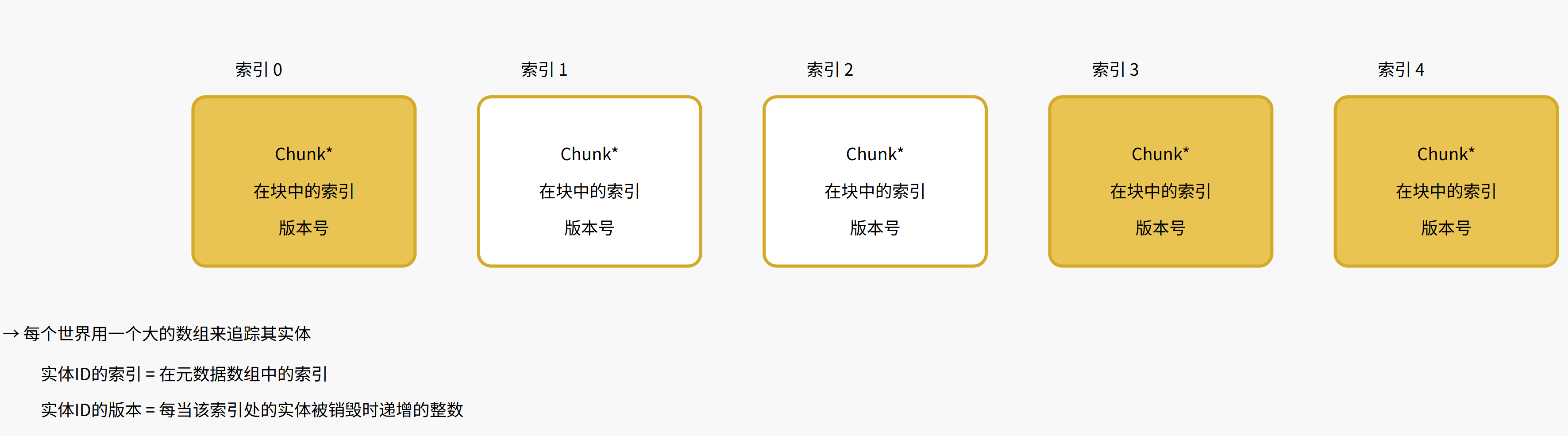
The entity version number allows entity indices to be reused after an entity is destroyed: when an entity is destroyed, the version number stored at its index is incremented, so if an ID's version number doesn't match the version stored at the index, the ID must refer to an entity that was either destroyed or may never have existed.
Tag Components
An IComponentData struct with no fields is called a tag component. Although tag components store no data, they can still be added to and removed from entities just like any other component type, which is useful for queries. For example, if all entities representing monsters in our world have a Monster tag component, querying for the Monster component type will match all monster entities.
// a tag component
public struct Monster : IComponentData
{
}
Dynamic Buffer Components
A DynamicBuffer is a resizable array component type. To define a DynamicBuffer component type, create a struct that implements the IBufferElementData interface.
// a dynamic buffer component type
public struct Waypoint : IBufferElementData
{
    public float3 Value:
}
Each entity's buffer stores a length, capacity, and a pointer:
Lengthindicates the number of elements in the buffer. It starts at 0 and increments as you append values to the buffer.Capacityindicates the buffer's storage size. It initially matches the internal buffer capacity (defaults to 128 / sizeof(T), but can be specified via theInternalBufferCapacityattribute on theIBufferElementDatastruct). Setting capacity resizes the buffer.- The pointer indicates where the buffer's contents are located. Initially it is null, meaning the content is stored directly in the chunk. If the capacity is set to exceed the internal buffer capacity, a new larger array is allocated outside the chunk, the content is copied to this external array, and the pointer points to this new array. If the buffer length exceeds the external array's capacity, the buffer content is copied to another new larger array outside the chunk, and the old array is freed. Buffers can also be shrunk.
When the EntityManager destroys the chunk itself, both the internal buffer capacity and the external capacity (if one exists) are freed.
Note: When a dynamic buffer is stored outside the chunk, the internal capacity is effectively wasted, and accessing the buffer's content requires an extra pointer indirection. These costs can be avoided by ensuring the internal capacity limit is never exceeded. Of course, in many cases, staying within this limit may require an impractically large internal capacity. Another option is to set the internal capacity to 0, which means any non-empty buffer will always be stored outside the chunk. This always requires a pointer indirection to access the buffer, but avoids wasted space in the chunk.
The EntityManager provides these key methods for dynamic buffers:
AddComponent<T>(): Adds a component of type T to an entity, where T can be a dynamic buffer component type.AddBuffer<T>(): Adds a dynamic buffer component of type T to an entity; returns the new buffer as aDynamicBuffer<T>.RemoveComponent<T>(): Removes a component of type T from an entity, where T can be a dynamic buffer component type.HasBuffer<T>(): Returns true if the entity currently has a dynamic buffer component of type T.GetBuffer<T>(): Returns the entity's dynamic buffer component of type T as aDynamicBuffer<T>.
DynamicBuffer<T> represents a single entity's dynamic buffer component of type T. Its key properties and methods include:
Length: Gets or sets the length of the buffer.Capacity: Gets or sets the capacity of the buffer.Item[Int32]: Gets or sets the element at the specified index.Add(): Adds an element to the end of the buffer, resizing it if necessary.Insert(): Inserts an element at the specified index, resizing if necessary.RemoveAt(): Removes the element at the specified index.Note: Performing any structural change operation invalidates a
DynamicBuffer, meaning that subsequent use of thatDynamicBufferwill throw an exception. To use the buffer again after a structural change, you must reacquire it.
Systems
A system is a unit of code belonging to an entity world that runs on the main thread (typically once per frame). Usually, a system only accesses entities from its own world, but this is not an enforced restriction.
Systems are defined as structs implementing the ISystem interface, which contains three key methods:
OnUpdate(): Called typically once per frame (depending on the system's system group).OnCreate(): Called before the first call toOnUpdateand when a system resumes running.OnDestroy(): Called when the system is destroyed.Note: These methods all have default empty implementations, so you can omit them from your system when not needed — for example, if your
OnCreatemethod body would be empty, you can simply omit the entire method.
If a system's Enabled property is set to false, its update will be skipped.
Systems can additionally implement the ISystemStartStop interface, which includes these methods:
OnStartRunning(): Called before the first call toOnUpdateand when a system is re-enabled (i.e., when itsEnabledproperty changes fromfalsetotrue).OnStopRunning(): Called beforeOnDestroyand when a system is disabled (i.e., when itsEnabledproperty changes fromtruetofalse).
System Groups and System Update Order
Systems within a world are organized into system groups. Each system group has an ordered list of children (systems and other system groups), and by default, each system group calls its children's OnUpdate in sort order. In effect, system groups form a hierarchy that determines the order of system updates.
- A system group is defined as a class that inherits from
ComponentSystemGroup. - When a system group updates, it typically updates its children in sort order, but this default behavior can be overridden by overriding the group's update method. For example,
FixedStepSimulationGrouphas custom update behavior that updates its children zero or more times per frame to approximate a fixed update interval. - A group's children are re-sorted whenever a child is added to or removed from the group.
- Children are added to a system group via the
UpdateInGroupattribute. Without this attribute, systems and system groups default to being added to theSimulationSystemGroup. - The
UpdateBeforeandUpdateAfterattributes can be used to determine the relative sort order of children within a group. For example, if FooSystem has the attribute[UpdateBefore(typeof(BarSystem))], then FooSystem will be placed somewhere before BarSystem in the sort order. But if FooSystem and BarSystem are not in the same system group, this attribute has no effect beyond triggering a warning. - If a group's children have contradictory sort attributes (e.g., child A is marked to update before child B, but child B is also marked to update before child A), sorting that group's children will throw an exception.
Creating Worlds and Systems
When entering play mode, the default auto-boot process creates a default world containing three system groups:
InitializationSystemGroup: Updates at the end of the initialization phase of the Unity player loop.SimulationSystemGroup: Updates at the end of theUpdatephase of the Unity player loop. This is typically where game logic is placed.PresentationSystemGroup: Updates at the end of thePreLateUpdatephase of the Unity player loop. This is typically where rendering code is placed.
The auto-boot process creates an instance of every system and system group (except those with the DisableAutoCreation attribute). These instances are added to the SimulationSystemGroup unless overridden by the UpdateInGroup attribute. For example, if a system has the [UpdateInGroup(typeof(InitializationSystemGroup))] attribute, it will be added to the InitializationSystemGroup instead of the SimulationSystemGroup.
The auto-boot process can be disabled via scripting defines:
#UNITY_DISABLE_AUTOMATIC_SYSTEM_BOOTSTRAP_RUNTIME_WORLD: Disables auto-boot of the default world.#UNITY_DISABLE_AUTOMATIC_SYSTEM_BOOTSTRAP_EDITOR_WORLD: Disables auto-boot of the editor world.#UNITY_DISABLE_AUTOMATIC_SYSTEM_BOOTSTRAP: Disables auto-boot of both the default world and the editor world.
When auto-boot is disabled, your code is responsible for:
- Creating worlds.
- Calling
World.GetOrCreateSystem<T>()to add system and system group instances to worlds. - Registering top-level system groups (such as
SimulationSystemGroup) for updates within the Unity player loop.
Alternatively, you can customize boot logic by creating a class that implements the ICustomBootstrap interface.
Time in Worlds and Systems
Each world has a Time property that returns a TimeData struct containing the frame delta time and elapsed time. This time value is updated by the world's UpdateWorldTimeSystem. The time value can be manipulated through these World methods:
SetTime: Sets the time value.PushTime: Temporarily changes the time value.PopTime: Restores the time value from before the most recent push.
Certain system groups (e.g., FixedStepSimulationSystemGroup) push a time value before updating their children and pop that value after updating. In effect, these system groups present a "fake" time value to their children.
SystemState
A system's OnUpdate(), OnCreate(), and OnDestroy() methods receive a SystemState parameter. SystemState represents the state of a system instance and includes these important methods and properties:
World: The world this system belongs to.EntityManager: The entity manager of the world this system belongs to.Dependency: AJobHandleused to pass job dependencies between systems.GetEntityQuery(): Returns an entity query.GetComponentTypeHandle<T>(): Returns aComponentTypeHandle<T>.GetComponentLookup<T>(): Returns aComponentLookup<T>.Important: Although entity queries, component type handles, and component lookups can be obtained directly from EntityManager, systems should generally acquire these from SystemState. When acquired through SystemState, the component types accessed by the system are tracked, which is essential for the system's Dependency property to correctly pass job dependencies between systems (discussed later).
SystemAPI
The SystemAPI class contains many static convenience methods whose functionality overlaps significantly with the World, EntityManager, and SystemState classes.
SystemAPI methods rely on source generators and are therefore only available inside systems and IJobEntity (not IJobChunk). The advantage of using SystemAPI is that these methods produce the same results in both contexts, so code using SystemAPI can generally be copied and pasted more easily between the two scenarios.
Note: If unsure where to look for Entities core functionality, the general rule is to check SystemAPI first. If SystemAPI doesn't provide what you need, check SystemState, and if still not found, consult EntityManager and World last.
SystemAPI also provides a special convenient Query() method that, through source generators, enables quick foreach loops over entities and components matching a query (as shown in the example below).
Accessing Entities in Jobs
You can offload processing of entity data to worker threads through the C# job system. The Entities package provides two job interfaces for accessing entities:
IJobChunk, whoseExecute()method is called once for each individual chunk matching the query.IJobEntity, whoseExecute()method is called once for each entity matching the query.
While IJobEntity is typically more convenient to write and use, IJobChunk provides more precise control. In most cases, both have equivalent performance when performing equivalent work.
Note: IJobEntity isn't actually a "real" job type: source generation expands the IJobEntity struct through an implementation of IJobChunk, so IJobEntity ultimately gets scheduled as IJobChunk.
To distribute the work of an IJobChunk or IJobEntity across multiple threads, schedule the job by calling ScheduleParallel() instead of Schedule(). When using ScheduleParallel(), the chunks matching the query are partitioned into batches that are assigned to worker threads for processing.
Structural changes cannot be performed inside a job, so you should only make structural changes on the main thread. However, jobs can record structural change commands through an EntityCommandBuffer (discussed later), which can then be played back on the main thread.
Sync Points
Certain operations on the main thread trigger "sync points" that complete some or all currently scheduled jobs. For example, calling EntityManager.AddComponent<T>() first completes all currently scheduled jobs that access any T component. Similarly, the EntityQuery methods ToComponentDataArray<T>(), ToEntityArray(), and ToArchetypeChunkArray() must first complete any currently scheduled jobs that access the same components as the query.
In many cases, these sync points also "invalidate" existing instances of certain types, particularly DynamicBuffer and ComponentLookup<T>. After an instance is invalidated, calling its methods will throw a safety check exception. If you still need to use an invalidated instance, you must obtain a new instance to replace it.
Component Safety Handles
Similar to native collections, each component type in each world has an associated job safety handle. This means that for any two jobs that access the same component type in the same world, the safety check will not allow those jobs to be scheduled concurrently. For example, when we try to schedule a job that accesses component type Foo and there is already a scheduled job that also accesses component type Foo, the safety check will throw an exception. To avoid this exception:
- The already scheduled job must be completed before the new job is scheduled
...or the new job must depend on the already scheduled job.
Note: Concurrent scheduling is safe when both jobs have read-only access to the same component type. For any component type that is never written to in a job, be sure to inform the safety check system by marking the component type handle with the ReadOnly attribute.
DynamicBuffer<T> instances themselves hold a safety handle:
- The contents of a
DynamicBuffer<T>cannot be accessed while any scheduled jobs that access the same buffer component type are still incomplete. - However, if the incomplete jobs only have read-only access to the buffer component type, reading that buffer from the main thread is allowed.
SystemState.Dependency
When we schedule a job in a system, we want it to depend on any currently scheduled jobs that might conflict with the new job, even if those jobs were scheduled in other systems. To help arrange these dependencies, SystemState has a JobHandle property called Dependency.
Just before a system updates:
- The system's
Dependencyproperty is completed - ...and then
Dependencyis assigned the combined job handles from theDependencyproperties of all other systems that access the same component types as this system. For example, in a system that accesses Foo and Bar component types, theDependencyhandles of all other systems in the world that also access Foo or Bar are combined into a single job handle and assigned to this system'sDependency.
In each system, you need to follow two rules:
- All jobs scheduled in a system update should depend (directly or indirectly) on the job handle assigned to the
Dependencyproperty before the update. - Before returning from a system update, the
Dependencyproperty should be assigned a handle that includes all jobs scheduled during that update.
As long as these two rules are followed, every job scheduled in a system update will depend on all scheduled jobs in other systems that might access the same component types.
Important: Systems do not track which native containers they use, so the Dependency property only considers component types, not native containers. Therefore, if two systems both schedule jobs using the same native container, their Dependency job handles won't necessarily be included in the job handles assigned to the other system's Dependency property, so jobs from different systems won't depend on each other as expected. In these cases, you can manually share job handles between systems to arrange dependencies, but a better solution is usually to store native containers in components: if you follow these two rules and both systems access the container through the same component type, jobs scheduled in both systems should depend on each other.
ComponentLookup<T>
While you can randomly access a single entity's components through EntityManager, we typically cannot use EntityManager inside jobs. Instead, we can use a type called ComponentLookup<T>, which gets and sets component values by entity ID. We can also use BufferLookup<T> to get dynamic buffers by entity ID.
Important: Remember that looking up an entity by ID often carries a cache-miss performance cost, so lookups should generally be avoided where possible. Of course, many problems do require random lookups, so they can't be avoided entirely! Just be careful not to overuse them indiscriminately.
The HasComponent() methods of ComponentLookup<T> and BufferLookup<T> return true when the specified entity has a component of type T. The TryGetComponent<T>() and TryGetBuffer<T>() methods do the same but additionally output the component value or buffer when it exists.
Note: To test whether an entity exists, we can call the Exists() method of EntityStorageInfoLookup. Indexing into EntityStorageInfoLookup returns an EntityStorageInfo struct containing a reference to the entity's chunk and its index within that chunk.
If a job only needs to read the components accessed via ComponentLookup<T>, the ComponentLookup<T> field should be marked with the ReadOnly attribute to pass job safety checks. The same rule applies to BufferLookup<T>.
In a parallel scheduled job, getting component values from ComponentLookup<T> requires the field to be marked with the ReadOnly attribute. Safety checks do not allow setting component values through ComponentLookup<T> in parallel scheduled jobs, as safety cannot be guaranteed. However, you can disable safety checks on a ComponentLookup<T> entirely by marking it with the NativeDisableParallelForRestriction attribute. The same applies to BufferLookup<T>. Ensure your code sets component values in a thread-safe manner!
Entity Command Buffers
Changes to entities can be deferred by recording commands into an EntityCommandBuffer. The recorded commands are executed when Playback() is called on the main thread.
Using EntityCommandBuffer to defer changes is particularly useful in jobs, which cannot directly perform structural changes (i.e., creating entities, destroying entities, adding components, or removing components). Jobs can record commands into an EntityCommandBuffer, which are then played back on the main thread after the job completes. EntityCommandBuffer also helps consolidate structural changes to a few points in a frame rather than scattering them throughout, avoiding unnecessary sync points.
EntityCommandBuffer has many (but not all) of the same methods as EntityManager, including:
CreateEntity(): Records a command to create a new entity, returning a temporary entity ID.DestroyEntity(): Records a command to destroy an entity.AddComponent<T>(): Records a command to add a component of type T to an entity.RemoveComponent<T>(): Records a command to remove a component of type T from an entity.SetComponent<T>(): Records a command to set the value of a component of type T.AppendToBuffer(): Records a command to append a single value to the end of an existing buffer component.AddBuffer(): Returns aDynamicBufferstored in the recorded command; when the entity is created during playback, the buffer's contents are copied into the entity's actual buffer. In effect, writing to the returned buffer sets the initial content of the buffer component.SetBuffer(): Similar toAddBuffer(), but assumes the entity already has a buffer of that component type. During playback, the entity's existing buffer content is overwritten with the content of the returned buffer.Note: Some EntityManager methods have no corresponding EntityCommandBuffer equivalent because an equivalent would be impractical or meaningless. For example, EntityCommandBuffer has no method for getting component values, as reading data cannot be efficiently deferred.
Note: An EntityCommandBuffer instance cannot be used to continue recording commands after playback. To record more commands, create a new, separate EntityCommandBuffer instance.
Each EntityCommandBuffer has a job safety handle, so the safety check will throw an exception when:
- ...calling methods of an
EntityCommandBufferon the main thread while thatEntityCommandBufferis still being used by any currently scheduled job. ...or scheduling a job that accesses an
EntityCommandBufferalready in use by another currently scheduled job (unless the new job depends on those other jobs).Important: You might be tempted to share a single EntityCommandBuffer instance across multiple jobs, but this is strongly discouraged. It may work in some cases, but it will cause problems in many others. For example, using the same EntityCommandBuffer.ParallelWriter in multiple parallel jobs can lead to unexpected ordering of command playback. Instead, the best practice is almost always to create and use one EntityCommandBuffer per job. Don't worry about performance differences: recording and playing back a set of commands split across multiple EntityCommandBuffers is no more expensive than recording them all into a single one.
Temporary Entity IDs
When you call an EntityCommandBuffer's CreateEntity() or Instantiate() methods, no new entity is created until the commands are executed during playback, so the entity IDs returned by these methods are temporary IDs with negative index numbers. Subsequent AddComponent, SetComponent, and SetBuffer commands on the same EntityCommandBuffer can use these temporary IDs. During playback, any temporary IDs in the recorded commands are remapped to the actual entities that were created.
Important: Since temporary entity IDs have no meaning outside the EntityCommandBuffer instance that created them, temporary entity IDs should only be used in subsequent method calls on the same EntityCommandBuffer instance. For example, do not use a temporary ID obtained from one EntityCommandBuffer when recording commands to a different EntityCommandBuffer instance.
EntityCommandBuffer.ParallelWriter
To safely record commands in parallel jobs, we use EntityCommandBuffer.ParallelWriter — a wrapper around the underlying EntityCommandBuffer. ParallelWriter has most of the same methods as EntityCommandBuffer itself, but all ParallelWriter methods require an additional "sort key" parameter to ensure determinism.
When EntityCommandBuffer.ParallelWriter records commands in a parallel job, the order of commands from different threads in the buffer depends on thread scheduling, leading to non-deterministic ordering. This non-determinism is problematic because:
- Deterministic code is generally easier to debug.
- Some networking code solutions rely on determinism to produce consistent results across different machines.
Although the recording order of commands cannot be determined, a simple trick makes the playback order deterministic:
- Each command records a "sort key" integer, passed as the first parameter to each command method.
- The playback method sorts commands by sort key before executing them.
As long as there is a deterministic mapping between sort key values and each recorded command, this sorting mechanism ensures deterministic playback order.
In IJobEntity, the sort key we typically want to use is ChunkIndexInQuery, which is unique per chunk. Since sorting is stable and all entities from a single chunk are processed together on a single thread, this index value is suitable as a sort key for recording commands. In IJobChunk, we can use the equivalent unfilteredChunkIndex parameter in the Execute method.
Multi-Playback
If an EntityCommandBuffer is created with the PlaybackPolicy.MultiPlayback option, its Playback method can be called multiple times. Otherwise, calling Playback multiple times will throw an exception. Multi-playback is primarily useful when you need to repeatedly generate a set of entities.
EntityCommandBufferSystem
An EntityCommandBufferSystem is a system that provides a convenient way to defer execution of EntityCommandBuffers. EntityCommandBuffer instances created from an EntityCommandBufferSystem will be executed and disposed the next time that EntityCommandBufferSystem updates.
Important: Do not manually execute and dispose EntityCommandBuffer instances created by an EntityCommandBufferSystem — the EntityCommandBufferSystem will execute and dispose them for you.
You rarely need to create any EntityCommandBufferSystem yourself, as the auto-boot process places these five systems into the default world:
BeginInitializationEntityCommandBufferSystemEndInitializationEntityCommandBufferSystemBeginSimulationEntityCommandBufferSystemEndSimulationEntityCommandBufferSystemBeginPresentationEntityCommandBufferSystem
For example, EndSimulationEntityCommandBufferSystem updates at the end of the SimulationSystemGroup.
Note: There is no "EndPresentationEntityCommandBufferSystem" at the end of a frame, but you can use BeginInitializationEntityCommandBufferSystem instead: the end of one frame and the beginning of the next are logically the same point in time.
Transform Components and Systems
LocalTransform is the primary standard component for representing an entity's transform. Transform hierarchies can be built using three additional components:
Parentcomponent stores the ID of this entity's parent.Childdynamic buffer component stores the IDs of this entity's children.PreviousParentcomponent stores a copy of the entity's parent ID.
To modify the transform hierarchy:
- Add a
Parentcomponent to parent an entity. - Remove an entity's
Parentcomponent to unparent it. - Set an entity's
Parentcomponent to change its parent.
ParentSystem ensures that:
- Every entity that has a parent includes a
PreviousParentcomponent pointing to its parent. Every parent entity that has one or more child entities has a
Childbuffer component referencing all its children.Important: While it is safe to read an entity's Child buffer and PreviousParent component, you should not modify them directly. The transform hierarchy should only be modified by setting an entity's Parent component.
Each frame, LocalToWorldSystem computes the world-space transform of each entity (based on the LocalTransform components of that entity and its ancestors) and assigns it to the entity's LocalToWorld component.
Note: Entity.Graphics systems read the LocalToWorld component but do not read any other transform components, so LocalToWorld is the only transform component needed for entity rendering.
Baking and Entity Scenes
Baking is the process of creating an entity scene from a subscene at build time by executing bakers and baking systems:
- An entity scene is a serialized set of entities and components that can be loaded at runtime.
- A subscene is a Unity scene asset embedded within another scene via the
SubScene MonoBehaviour. - A baker is a class inheriting from
Baker<T>, where T is aMonoBehaviour. AMonoBehaviourwith aBakeris called an "authoring component". - A baking system is a system with the
[WorldSystemFilter(WorldSystemFilterFlags.BakingSystem)]attribute. (Baking systems are typically only needed in advanced use cases.)
The baking process for a subscene involves these main steps:
- A corresponding entity is created for each GameObject in the subscene.
- The baker for each authoring component in the subscene is executed. Each baker can read the authoring component and add components to the corresponding entity